
The SHHT List You Actually Need
The SHHT List for Living Well at Home
Smart Home Health Technologies—thankfully shortened to SHHTs—are tools that can make daily life at home safer, easier, and more connected.
They are not just for people with serious health problems, and they do not have to turn your home into mission control. Simple technology can support independence, reduce everyday frustrations, provide peace of mind for the whole family, and help people continue living well at home.
Here is your SHHT List (I just love saying this 😏)
1. Safety and Emergency Support
These tools help prevent emergencies or bring help more quickly.
Examples include:
Medical alert buttons
Smartwatches with fall detection
Automatic stove shutoff devices
Water-leak sensors
Smart smoke and carbon monoxide detectors
Motion-activated nightlights
The goal is to make the home safer without taking away independence. You may find these through pharmacies, medical-equipment companies, home-security providers, hardware stores, electronics stores, and online retailers.
2. Health Monitoring
Health-monitoring tools can help track what is happening between appointments.
Examples include:
Blood pressure monitors
Blood sugar meters
Pulse oximeters
Scales
Heart-rate trackers
Sleep or activity trackers
The benefit is that changes may be noticed earlier. Of course, the tool is only helpful if someone knows what the numbers mean and when to report them. Otherwise, it is just a very expensive paperweight with batteries.
You may find these through pharmacies, medical-equipment suppliers, healthcare systems, insurance programs, and major retailers.
3. Medication Support
Medication technology can help when the medication list gets longer or the schedule gets complicated.
Examples include:
Reminder alarms
Medication apps
Automatic pill dispensers
Locked medication dispensers
Refill reminders
Missed-dose alerts to family
The goal is to reduce missed doses, accidental double-dosing, refill confusion, and the classic “Did I already take that?” moment.
You may find these through pharmacies, medical-supply companies, app stores, online retailers, and companies that specialize in medication-management devices. A pharmacist can help determine what level of support makes sense.
For more about keeping your medication information current, read Too Many Meds? Time to Reconcile!
4. Everyday Independence
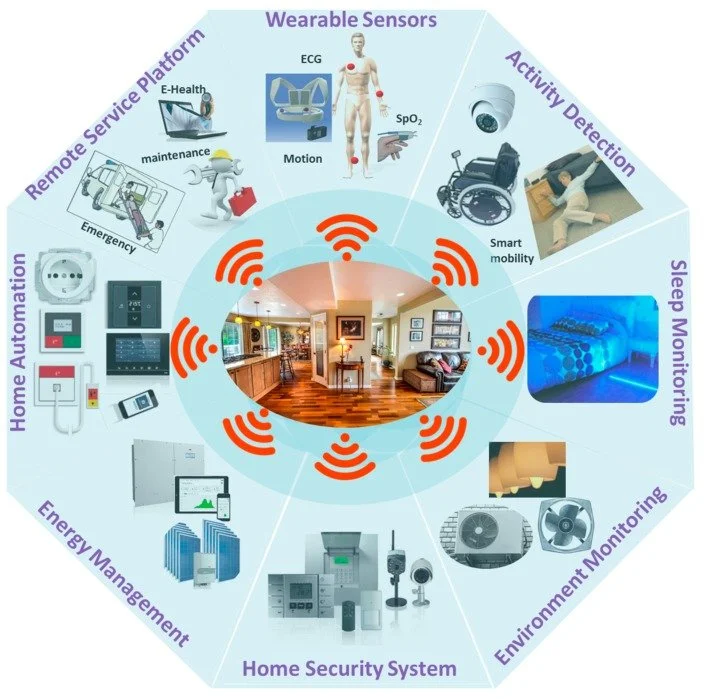
Some smart technology helps with daily tasks that become harder with age, arthritis, vision changes, memory changes, pain, or limited mobility.
Examples include:
Voice assistants
Smart lights
Video doorbells
Smart locks
Thermostats
Automated blinds
Smart plugs
These tools can help someone control small household tasks without needing to bend, reach, rush, or move through a dark house.
Start with one daily frustration, not an entire cart full of gadgets.
5. Home and Activity Monitoring
Home-monitoring tools can help a trusted person notice when something seems off.
Examples include:
Motion sensors
Door sensors
Appliance alerts
Bed sensors
Activity pattern monitoring
An alert may be sent if a door opens unexpectedly, movement has not been detected, or an appliance was left on.
This can offer peace of mind, especially for adult children or long-distance caregivers. But privacy and consent matter. Everyone should know what is being monitored, who can see the information, and what happens if an alert is received.
6. Communication and Connection
Technology can also help people stay connected.
Examples include:
Video calling
Simplified tablets
Smart displays
Amplified phones
Captioning phones
Voice assistants that call family
Connection is part of living well. Technology can help someone attend a virtual appointment, join a family celebration, receive photos, or call a loved one without fighting with a complicated device.
And if the device is too complicated, it will live in a drawer. That is not technology support. That is drawer decor.
Start With the Person, Not the Product
The best technology is not necessarily the newest, fanciest, or most expensive. It is the one the person understands, accepts, and will actually use.
Start with one concern: falls, medication confusion, isolation, mobility, home safety, or health monitoring. Then choose the simplest tool that addresses it.
Technology should support independence and human connection, not replace them.
For related guidance, read Independence Isn’t Doing Everything Alone: How Support Helps Seniors Age in Place.
For additional planning resources, see the National Institute on Aging’s Aging in Place: Growing Older at Home.
Need Help Sorting It Out?
Aging in place is not just about staying in the same house. It is about living safely, meaningfully, and as independently as possible.
But choosing support can get confusing fast. There are gadgets, subscriptions, apps, monitoring systems, privacy concerns, family opinions, and plenty of “this one has five stars online.”
That is where many people get stuck.
Ask the Advocate is a good place to start when you know support is needed but are not sure what kind, how much, or where to begin.
Schedule an Ask the Advocate session. 👉 Ask the Advocate
You bring the concern. I help you sort through the moving pieces so you can take the next step with more confidence and control.
✨ Stay confident. Stay informed. Stay Taylormade.